


In this guide, you’ll learn how to rank a junk removal website on Google using simple local SEO steps that any junk removal business owner can follow.
Someone in your area needs something gone fast. They grab their phone and type:
- “junk removal near me”
- “junk removal [your city]”
- “hauling service [your city]”
If your junk removal website doesn’t show up on Google, you’re invisible.
The calls go to big franchises and better‑optimized competitors, no matter how good your service is.
The good news: you don’t need to become an SEO expert. With a few focused steps, you can:
- Get your junk removal website indexed and visible on Google
- Show up for local searches in your city
- Turn website visitors into calls, texts, and quote requests
This guide is written in plain language, specifically for junk removal owners and operators.
Step 1: Make Sure Google Can Actually Find Your Website
Before you worry about ranking, you need to make sure Google can see your website.
1.1 Check if you’re indexed
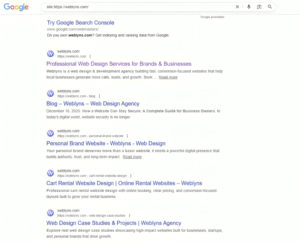
Go to Google and search: site:yourwebsite.com (Example: site:https://weblyns.com)
- If you see some pages, your site is indexed.
- If you see no results, Google may not know your site exists yet.
1.2 Submit your site to Google Search Console
If you haven’t already:
- Visit Google Search Console and add your website.
- Verify ownership (usually via DNS or HTML file).
- Submit your sitemap (often yourwebsite.com/sitemap.xml).
This tells Google, “Hey, here’s my junk removal website, please crawl and index it.”
Step 2: Set Up and Optimize Your Google Business Profile
For searches like “junk removal near me,” Google often shows the map pack (the 3 businesses with a map). You can’t win locally without a Google Business Profile (GBP).
2.1 Claim or create your profile
- Go to Google Business Profile (search “Google Business Profile” and click the official result).
- Sign in with your Google account.
- Add your junk removal business name, address (or service area), phone number, website URL, and hours.
- Verify your business (usually via postcard or phone).
2.2 Optimize your profile
- Use your main category as “Junk Removal Service”.
- Add service areas (cities/suburbs you cover).
- Write a clear description with your city and services, e.g.:
We’re a local junk removal service in [City, State], hauling furniture, appliances, construction debris, and more. Same‑day and next‑day jobs available.
- Upload photos of your truck, crew, and before/after jobs.
- Start asking customers for Google reviews.
Step 3: Get Your On‑Page SEO Basics Right
On‑page SEO is how you tell Google what your junk removal website is about and what location you serve.
3.1 Choose the right keywords
You don’t need hundreds. Start with a handful like:
- junk removal [city]
- junk removal near me
- hauling service [city]
- furniture removal [city]
- appliance removal [city]
Example for Dallas:
junk removal Dallas, TX
junk removal Dallas, TX
hauling service Dallas, TX
junk removal near me Dallas, TX
You’ll use these naturally in headings and text.
3.2 Optimize your homepage
Your homepage is usually the most powerful page on your site. Make sure it:
Has a clear H1 heading, e.g.:
Junk Removal in [City, State] – Fast, Local Hauling Service
- Mentions your city and services in the first paragraph.
- Shows a phone number and “Call Now” button at the top.
- Includes your main services
- residential junk removal
- commercial junk removal
- property cleanouts
- construction debris removal, etc.
- Lists your service areas (cities/suburbs).
Example intro:
We’re a local junk removal company serving [City] and surrounding areas. From single‑item pickups to full house cleanouts, we haul away furniture, appliances, yard waste, construction debris, and more, fast and affordable.
Image placement idea:
Hero image of your crew loading a truck in front of a house.
Alt text: “Junk removal crew loading truck in [city] neighborhood”
3.3 Create dedicated service pages
Instead of one long homepage trying to explain everything, create:
- A page for Residential Junk Removal
- A page for Commercial Junk Removal
- A page for Property Cleanouts / Landlords / Realtors
- A page for Construction Debris Removal
Each page should:
- Use an H1 like “Residential Junk Removal in [City, State]”
- Explain what’s included, how pricing works, and your process
- Have a “Call Now” and “Get a Quote” button
3.4 Create a Service Area or “Cities We Serve” page
If you cover multiple suburbs or nearby towns, create a Service Areas page listing them all, e.g.:
We provide junk removal in [City], [Nearby City 1], [Nearby City 2], [Suburb A], [Suburb B], and more.
Over time you can add short sections for each area.
Step 4: Make Your Site Fast and Mobile‑Friendly
Most junk removal customers search on their phone. Google also uses mobile performance as a ranking factor.
Check:
- Does your site load in a few seconds on mobile data?
- Is the text large enough to read without zooming?
- Are buttons easy to tap with a thumb?
- Is your phone number clickable (tel: link)?
Use Google’s PageSpeed Insights to test your site and look for simple fixes (image compression, caching, etc.).
Step 5: Add Real Reviews, Photos, and Trust Signals
Google wants to rank businesses that real people trust.
On your website:
- Embed or screenshot Google reviews (with permission).
- Add a section like “Why Choose Us” with bullets:
- Licensed & insured
- Upfront, volume‑based pricing
- Same‑day and next‑day jobs available
- Responsible disposal (recycle / donate where possible)
- Show before & after photos of jobs.
These not only convert more visitors into customers, they also help your pages feel more legitimate to Google.
Step 6: Build Local Citations and Links
You don’t need hundreds of backlinks, but you do need consistent local citations.
6.1 Local business listings
Make sure your business name, address, and phone number are consistent on:
- Google Business Profile
- Yelp
- Facebook page
- Local chamber of commerce directory
- Any reputable local directories in your area (not spammy link farms)
Format your details exactly the same everywhere.
6.2 Simple, safe backlinks
Good, easy backlinks for a junk removal website:
- A link from your dump site / transfer station / recycling center if they list local haulers.
- Local property managers, realtors, or contractors you work with who have a “Preferred Vendors” page.
- Being featured in a local blog or news article about home services.
Ask them politely if they can add:
Junk removal by Your Business Name
Link idea:
In your blog, briefly list “good places to get local links” and encourage owners to ask for a link any time they’re featured online.
Step 7: Add Helpful Content That Answers Questions
Google likes websites that answer people’s questions. Create simple blog posts or FAQ content such as:
- “What Items Will a Junk Removal Company Take?”
- “How Does Junk Removal Pricing Work in [City]?”
- “Junk Removal vs Dumpster Rental – Which Is Better for You?”
- “How to Prepare for a Junk Removal Pickup”
Step 8: Track, Tweak, and Be Patient
SEO isn’t instant. It may take a few weeks or months for your junk removal website to move up the rankings—especially in competitive cities.
Use:
- Google Search Console to see which keywords you’re showing up for.
- Google Analytics / GA4 to track website traffic and which pages people visit.
- Call tracking (or at least a separate “website” phone number) to see how many calls come from your site.
Then:
- Improve or expand content for pages that are close to ranking.
- Add more internal links to important pages.
- Keep getting new reviews and updating photos.
When to Hire a Junk Removal Website Designer
You can do many of these steps yourself, but sometimes it’s faster and cheaper in the long run to hire help, especially if:
- Your current site is DIY and outdated
- You’re not showing up anywhere in Google
- You’re busy actually running jobs and don’t have days to spend learning SEO and design
A good junk removal website designer will:
- Build a conversion‑focused website that drives calls and quote requests
- Handle on‑page SEO basics for your city and services
- Connect forms, tracking, and Google Business Profile
- Give you a site you can easily update later
If you’d rather focus on running your crew and trucks, consider partnering with a web designer who specializes in service businesses.
Final Thoughts
You don’t need fancy tricks to rank your junk removal website on Google.
If you:
- Make sure Google can find and index your site
- Set up and optimize your Google Business Profile
- Get your on‑page SEO right (keywords, headings, pages)
- Make your site fast, mobile‑friendly, and trustworthy
- Build a few good local citations and links
- Keep adding helpful content and reviews
…you’ll be far ahead of most local competitors.
And if you’d like help building a lead‑focused junk removal website that already follows these best practices, that’s exactly what we do at Weblyns.